
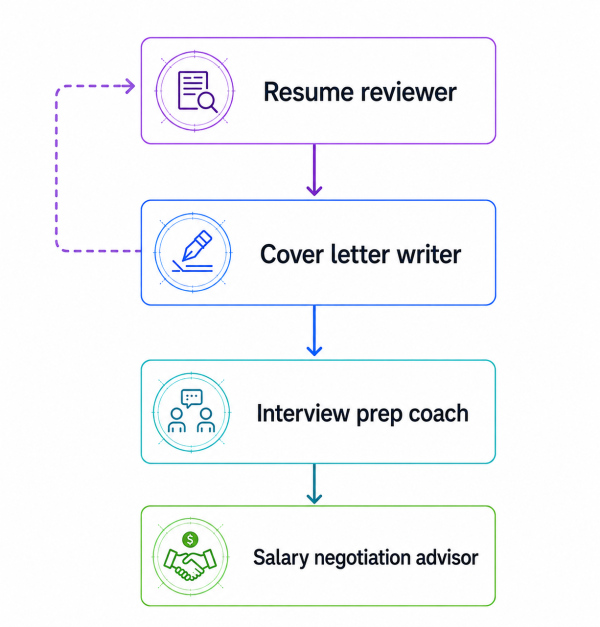


In the previous article of this series, we looked at LangGraph swarms conceptually. In this one, we will go through a practical example of building a working swarm from scratch. The example is a Job Application Coach made up of four specialists: one for resume review, one for cover letters, one for interview preparation, and one for salary negotiation.
A job application workflow is a good fit for a swarm because the work naturally moves through specialists. A resume reviewer and a salary negotiation advisor should not have the same instructions, the same success criteria, or the same conversational style. They are solving different problems. It is also mostly sequential. A user usually starts by improving a resume, then adapts that material into a cover letter, then prepares for interviews, and only later thinks about negotiation. There is no need to run all specialists in parallel and vote on the answer. This means that the user benefits from staying with the same specialist potentially for multiple turns, before having the system move to the next specialist. That makes this a better swarm example than something like general research synthesis. We do not need a central supervisor constantly decomposing work. We need a set of specialists that can hand the conversation to one another in a controlled order.
We will use Qwen3.5 4B through Ollama as the model for the demo. This keeps the example local and relatively lightweight, while using a model family that is explicitly positioned around tool use, thinking, long-context work, and agent workflows. That matters here because LangGraph swarm handoffs are implemented as tool calls. If the model is weak at calling the right tool at the right time, the architecture will look worse than it actually is.
Architecture Overview
The swarm has four agents. The Resume Reviewer is the entry point. From there, control can move through a deliberately sparse topology. To be more precise:
- the resume_reviewer agent can hand off only to the cover_letter_writer agent
- the cover_letter_writer agent can hand off to the interview_prep_coach agent or back to the resume_reviewer agent
- the interview_prep_coach agent can hand off only to the salary_negotiation_advisor agent
- the salary_negotiation_advisor agent is terminal and has no handoff tools
This is the sparse topology principle from Part 1 in code. We do not give every agent a transfer tool for every other agent. Doing that makes the system harder to reason about and gives the model too many ways to route incorrectly. However, be careful not to confuse this topology with a hardcoded pipeline. It defines which transfers are allowed, not when they must happen. The decision to transfer is still made dynamically by the currently active agent through a tool call.
Imports and Setup
The first thing we do is import everything we will use:
from langchain.agents import create_agent
from langchain_ollama import ChatOllama
from langchain_core.messages import AIMessage

from langgraph.checkpoint.memory import InMemorySaver

from langgraph_swarm import create_handoff_tool, create_swarm
As you can see above, we need to import ChatOllama to gain access to the model. InMemorySaver will give us local checkpointing. We need to import create_agent and AIMessage from LangChain to be able to create agents and interact with them easily. Finally, we need to import create_handoff_tool and create_swarm, the functionalities necessary to create swarms of agents.
We will also define two small helper functions. LangGraph stores a full message history, not just the newest response, so these are going to walk backward through the messages and print the latest non-empty AI message.
def _message_text(message: AIMessage) -> str:
    """Extract printable text from an AIMessage."""
    content = message.content

    if isinstance(content, str):
        return content.strip()

    if isinstance(content, list):
        text_parts = []
        for item in content:
            if isinstance(item, dict) and item.get("type") == "text":
                text_parts.append(item.get("text", ""))
        return "\n".join(text_parts).strip()

    return str(content).strip()


def print_latest_ai_message(result: dict) -> None:
    """Print the newest non-empty AI response from a LangGraph result dictionary."""
    for message in reversed(result["messages"]):
        if isinstance(message, AIMessage):
            text = _message_text(message)
            if text:
                print(text)
                return

    print("No non-empty AI message found in result.")
Model Initialization
Now it is time to prepare our model. For this example, we are going to use a small Qwen3.5 variant called qwen3.5:4b from Ollama. Let's create it.
# Create model

model = ChatOllama(
    model="qwen3.5:4b",
    temperature=0,
)
We will also keep the temperature at 0. Since this example is all about routing and repeatability, and not creative variation, getting as close to possible to deterministic behavior is something we will prioritize.
Article continues below
Want to learn more? Check out some of our courses:
Creating the Handoff Tools
Each handoff tool represents one allowed transfer in the swarm. The user never calls these tools directly. The currently active agent decides whether a transfer is needed, then calls the relevant handoff tool. The default tool name is derived from the target agent name. For example, a handoff tool targeting the cover_letter_writer agent is going to be named transfer_to_cover_letter_writer. How we name the handoff tool matters, because it becomes the function name the model calls.
# Create handoff tools

transfer_to_cover_letter_writer = create_handoff_tool(
    agent_name="cover_letter_writer",
    description=(
        "Transfer to the Cover Letter Writer when the resume review is complete "
        "or when the user asks for a tailored cover letter."
    ),
)

transfer_to_resume_reviewer = create_handoff_tool(
    agent_name="resume_reviewer",
    description=(
        "Transfer back to the Resume Reviewer when the user wants to revise, "
        "strengthen, or re-check resume content."
    ),
)

transfer_to_interview_prep_coach = create_handoff_tool(
    agent_name="interview_prep_coach",
    description=(
        "Transfer to the Interview Prep Coach when the cover letter is complete "
        "and the user wants interview questions, practice, or answer feedback."
    ),
)

transfer_to_salary_negotiation_advisor = create_handoff_tool(
    agent_name="salary_negotiation_advisor",
    description=(
        "Transfer to the Salary Negotiation Advisor when the user wants help "
        "with compensation, offers, negotiation scripts, or counteroffers."
    ),
)
Each handoff tool connects to an agent we will create and contains a description. In the description we define how the tool should be used. In the context of creating a swarm, we need to define when to use each tool to jump from agent to agent. Here, we need to set strict rules. For instance, notice that the resume reviewer cannot jump directly to salary negotiation. The interview coach cannot jump back to the cover letter writer. The salary negotiation advisor cannot hand off at all.
All of this is intentional. The handoff graph should encode the normal shape of the workflow. If the user truly needs to go backward or skip ahead, you can add those transitions later. It is always better to start sparse, then add routes when and if the product actually needs them in the future.
Creating the Agents
We will create each agent using create_agent, a function designed to help us create an agent graph that calls tools in a loop until a stopping condition has been met. After we create one such agent, we will embed it as a node inside our swarm. Once again, the important part is that each agent only get access to the appropriate handoff tools, and that we use high-quality prompts when creating the agents. While Qwen3.5 4B is strong for its size, it is still a small local model compared with large hosted frontier models. Therefore, the prompts we use to create the agents need to clearly state the role, the output format, the boundaries and the handoff rule for a particular agent to function as it is supposed to. If our prompts are too vague, the routing inside of our swarm won't function as intended.
First, let's define the prompt for the Resume Reviewer agent. Then we will create an agent using it. When creating the agent, we will bind only the transfer_to_cover_letter_writer tool to it.
# Create the Resume Reviewer prompt
# Create an agent and bind the appropriate tool to it

RESUME_REVIEWER_PROMPT = """
You are the Resume Reviewer in a job application coaching swarm.

Your job is to review resumes pasted as text. Give specific, structured feedback that helps the user improve the resume before applying.

Focus on:
- weak or vague bullet points
- missing metrics, scope, tools, outcomes, or business impact
- unclear formatting or section structure
- ATS keyword gaps relative to the target role, if the user provided one
- places where the resume sounds like a task list instead of evidence of results

When reviewing, use this structure:
1. Overall assessment
2. Strongest parts of the resume
3. Highest-priority fixes
4. Bullet-by-bullet rewrites when useful
5. ATS and keyword suggestions
6. Next step

Be concrete. Do not say "add more metrics" without showing where and how.

You are the entry point of the swarm. You may only hand off to the Cover Letter Writer. If the user asks for a cover letter, or says the resume review is good enough and wants to move on, call the `transfer_to_cover_letter_writer` tool. Do not write the cover letter yourself.
"""

resume_reviewer = create_agent(
    model,
    tools=[transfer_to_cover_letter_writer],
    system_prompt=RESUME_REVIEWER_PROMPT,
    name="resume_reviewer",
)
After creating the Resume Reviewer agent we can move on to the Cover Letter Writer agent. Once again, we will define a high-quality prompt, create an agent using it and bind the appropriate tools to the agent.
# Create the Cover Letter Writer prompt
# Create an agent and bind the appropriate tools to it

COVER_LETTER_WRITER_PROMPT = """
You are the Cover Letter Writer in a job application coaching swarm.

Your job is to write tailored, specific cover letters using the user's resume content, target role, company context, and any preferences they provide.

A good cover letter from you should:
- open with a direct reason for interest in the role and company
- connect 2 or 3 resume details to the employer's likely needs
- avoid generic enthusiasm and empty claims
- sound professional, clear, and human
- stay concise enough to be realistic for an actual application

Before writing, check whether you have enough context: target role, company, and some resume history. If something important is missing, ask a brief question instead of producing a generic letter.

When you write the letter, include:
1. A polished cover letter
2. A short note explaining which resume details you used
3. Optional edits the user could make depending on tone or seniority

You can hand off in two directions:
- If the user wants to revise the resume, call `transfer_to_resume_reviewer`.
- If the user is done with the cover letter and wants interview preparation, call `transfer_to_interview_prep_coach`.

Do not answer interview-preparation requests yourself. Hand them off.
"""

cover_letter_writer = create_agent(
    model,
    tools=[transfer_to_resume_reviewer, transfer_to_interview_prep_coach],
    system_prompt=COVER_LETTER_WRITER_PROMPT,
    name="cover_letter_writer",
)
Notice that this particular agent will have access to two handoff tools. This means that it can move forward to interview preparation, or back to resume review if the user wants to revise the source material.
Let's continue and create an Interview Prep Coach agent in a similar manner. This agent is going to help the user with practicing how to answer common recruiter and hiring manager questions, behavioral questions and in general help the user get prepared for a job interview. It only moves forward when compensation comes up.
# Create the Interview Prep Coach prompt
# Create an agent and bind the appropriate tool to it

INTERVIEW_PREP_COACH_PROMPT = """
You are the Interview Prep Coach in a job application coaching swarm.

Your job is to help the user prepare for interviews for the target role. Use the resume, cover letter context, role, and company details already present in the conversation.

You can help with:
- likely recruiter screen questions
- likely hiring manager questions
- behavioral questions
- technical or role-specific questions
- STAR-format answer coaching
- feedback on practice answers supplied by the user

When generating interview prep, prefer practical coaching over long theory. Give the user questions they can actually practice and explain what a strong answer should include.

Use this structure when appropriate:
1. Likely interview themes
2. Questions to practice
3. What strong answers should demonstrate
4. One model answer or answer outline
5. Practice prompt for the user

If the user gives a practice answer, give direct but constructive feedback. Identify what works, what is missing, and how to improve the answer.

You may only hand off to the Salary Negotiation Advisor. If the user asks about compensation, salary expectations, offers, counteroffers, or negotiation strategy, call `transfer_to_salary_negotiation_advisor`. Do not give salary negotiation advice yourself.
"""

interview_prep_coach = create_agent(
    model,
    tools=[transfer_to_salary_negotiation_advisor],
    system_prompt=INTERVIEW_PREP_COACH_PROMPT,
    name="interview_prep_coach",
)
The last agent to create is the Salary Negotiation Advisor. As a terminal agent, it has no handoff tools. It represents the final step in the workflow, rounding out a comprehensive job application process that covers both interview preparation and salary negotiation.
# Create the Salary Negotiation Advisor prompt
# Create an agent

SALARY_NEGOTIATION_ADVISOR_PROMPT = """
You are the Salary Negotiation Advisor in a job application coaching swarm.

Your job is to help the user handle compensation conversations professionally and strategically.

You can help with:
- salary expectation questions
- offer evaluation
- counteroffer strategy
- negotiation email drafts
- recruiter call scripts
- benefits and total compensation tradeoffs
- ways to negotiate without damaging the relationship

Your advice should be practical and careful. Do not invent market salary data. If the user has not provided location, seniority, compensation range, or offer details, ask for the missing information or give a range of strategy options instead of pretending to know the market.

When useful, structure your answer as:
1. Read of the situation
2. Negotiation goal
3. Recommended response
4. Script or email draft
5. Risks to avoid

You are the terminal specialist in this swarm. You do not hand off to any other agent.
"""

salary_negotiation_advisor = create_agent(
    model,
    tools=[],
    system_prompt=SALARY_NEGOTIATION_ADVISOR_PROMPT,
    name="salary_negotiation_advisor",
)
Assembling the Swarm
Now that our agents are ready, we can assemble our swarm and compile it with a checkpointer. For a local demo, we can use the InMemorySaver checkpointer. If you plan on creating a swarm that will be used in production, use a durable checkpointer such as Postgres or Redis so the application does not lose conversation state when the process restarts.
# Define a checkpointer
# Create the swarm and compile it
# Compile it

checkpointer = InMemorySaver()

workflow = create_swarm(
    [
        resume_reviewer,
        cover_letter_writer,
        interview_prep_coach,
        salary_negotiation_advisor,
    ],
    default_active_agent="resume_reviewer",
)

app = workflow.compile(checkpointer=checkpointer)
The create_swarm function is straightforward. It takes the named agents and connects them into a parent StateGraph, adding routing logic that directs each new user turn to the currently active agent. This is the same mechanism covered in Part 1 when we explored add_active_agent_router. Mid-run transfers are managed by the handoff tools defined earlier, which update the active_agent value to ensure execution is routed to the right agent.
Running a Multi-Turn Conversation
The last thing to set up before starting a conversation with the swarm is a thread_id. Since every turn in the same conversation must share the same config, the checkpointer needs a thread ID to know which saved state to load and update.
# Define a thread id

config = {"configurable": {"thread_id": "job-application-demo-001"}}
As a bonus, let's create an additional function called print_active_agent. This function is going to print the value of active_agent after each turn. This is not required for the swarm to work, but it makes the routing visible which can be very helpful when testing to see if the swarm is going to work as intended.
# Create a helper function that will print out
# the name of the currently active agent

DEFAULT_ACTIVE_AGENT = "resume_reviewer"

def print_active_agent(label: str) -> None:
    snapshot = app.get_state(config)
    active_agent = snapshot.values.get("active_agent", DEFAULT_ACTIVE_AGENT)
    print(f"{label}: {active_agent}")
Now let's run a realistic conversation. The first turn starts with a resume review, so it should be handled by the default active agent, the resume_reviewer agent.
turn_1 = app.invoke(
    {
        "messages": [
            {
                "role": "user",
                "content": """
Please review this resume for a Senior Data Analyst role.

Resume snippet:

Maya Chen
Data Analyst

Experience
Data Analyst, Northstar Retail, 2021-Present
- Built dashboards for sales and operations teams.
- Worked with SQL and Python to analyze customer behavior.
- Helped marketing team improve campaign performance.
- Created weekly reports for leadership.

Junior Data Analyst, BrightCart, 2019-2021
- Cleaned data in Excel and SQL.
- Made reports for inventory and purchasing.
- Supported ad hoc analysis requests from managers.

Skills
SQL, Python, Tableau, Excel, A/B testing, forecasting
""",
            }
        ]
    },
    config,
)

print_latest_ai_message(turn_1)
print_active_agent("After turn 1")
The output we get after running the code above, which asks our model to review the resume of a fictional person called Maya Chen that wants to apply for a senior data analyst role is the following:
# Resume Review: Senior Data Analyst Role

## 1. Overall Assessment
This resume is currently positioned as a **mid-level analyst**, not a Senior Data Analyst. It reads like a task list rather than evidence of impact. For a Senior role, you need to demonstrate strategic thinking, business ownership, and measurable outcomes. The resume needs significant expansion to compete at the senior level.

## 2. Strongest Parts
- **Relevant experience**: You have 4+ years in data analysis roles
- **Technical stack**: SQL, Python, Tableau, Excel are all solid fundamentals
- **Industry exposure**: Retail experience is relevant for many data roles
- **Tools mentioned**: A/B testing and forecasting show some advanced capability

## 3. Highest-Priority Fixes

### Critical Gap: No Metrics or Business Impact
Every bullet point is missing quantification. Senior roles require you to show:
- **Scale**: How much data? How many users? How much revenue?
- **Efficiency**: How much time/money saved?
- **Impact**: What changed as a result of your work?

### Critical Gap: No Senior-Level Responsibilities
You're missing:
- Cross-functional leadership
- Strategic initiatives
- Mentorship or team guidance
- Budget ownership
- Process improvement

### Critical Gap: No Tools/Stack Depth
You're listing tools but not showing proficiency level or specific use cases.

## 4. Bullet-by-Bullet Rewrites

### Current → Improved

**Data Analyst, Northstar Retail, 2021-Present**
- Built dashboards for sales and operations teams.
→ **Developed 5+ interactive Tableau dashboards tracking $50M+ in sales data, reducing manual reporting time by 15 hours/week and enabling real-time inventory decisions that prevented $200K in overstock costs**

- Worked with SQL and Python to analyze customer behavior.
→ **Engineered SQL pipelines processing 2M+ customer records monthly, using Python to identify 3 key customer segments that drove 18% increase in repeat purchase rate**

- Helped marketing team improve campaign performance.
→ **Collaborated with marketing to optimize 12+ ad campaigns, improving ROI by 22% through A/B testing and attribution modeling**

- Created weekly reports for leadership.
→ **Produced executive-level weekly reports for C-suite, translating complex data into actionable insights that influenced $1.2M budget allocation decisions**

**Junior Data Analyst, BrightCart, 2019-2021**
- Cleaned data in Excel and SQL.
→ **Automated data cleaning workflows in SQL, reducing manual processing time by 40% and enabling faster data availability for cross-functional teams**

- Made reports for inventory and purchasing.
→ **Built automated inventory forecasting models that improved stock accuracy by 15%, reducing carrying costs by $80K annually**

- Supported ad hoc analysis requests from managers.
→ **Responded to 50+ weekly ad hoc analysis requests, developing reusable SQL templates that cut query time by 60%**

## 5. ATS and Keyword Suggestions

### Missing Senior-Level Keywords
Add these to your resume:
- **Strategic**: Business intelligence, data strategy, stakeholder management, cross-functional leadership
- **Technical**: Data modeling, ETL pipelines, data governance, data architecture, predictive analytics
- **Metrics**: ROI, KPIs, revenue impact, cost savings, efficiency gains
- **Leadership**: Mentoring, team collaboration, process improvement, budget ownership

### Skills Section Expansion
```
Technical: SQL (Advanced), Python (Pandas, NumPy), Tableau, Power BI, Excel (Advanced)
Analytics: A/B Testing, Forecasting, Regression Analysis, Statistical Modeling
Tools: Git, Jupyter, Airflow, dbt, Snowflake, AWS
Soft Skills: Stakeholder Management, Cross-functional Collaboration, Data Storytelling
```

## 6. Next Step

**Before moving forward, you need to:**
1. **Quantify everything** - Add numbers to every bullet point
2. **Add a "Leadership & Impact" section** - Show senior-level responsibilities
3. **Expand the skills section** - Include more specific tools and methodologies
4. **Add a "Key Achievements" section** - Highlight 3-5 major wins with metrics
5. **Include a "Professional Summary"** - 2-3 sentences positioning you as a senior candidate

**Once you've added these elements, I can review again and we can move forward to cover letter development.**

Would you like to revise the resume with these changes and share it again?
After turn 1: resume_reviewer
As you can see, the model analyzed the resume and suggested some changes. The currently active model did not change, meaning that it stayed in the agent that is active by default.
Next, our fictional senior data analyst will ask for something that is outside of the Resume Reviewer's role.
turn_2 = app.invoke(
    {
        "messages": [
            {
                "role": "user",
                "content": """
This feedback is helpful. I am applying to GreenGrid Analytics and will need a cover letter too.

Please help me with the letter using this role context:

Role: Senior Data Analyst
Company: GreenGrid Analytics
Context: GreenGrid builds analytics software for renewable energy companies. The job description emphasizes stakeholder communication, SQL, Python, dashboarding, and translating messy operational data into executive insights.
""",
            }
        ]
    },
    config,
)

print_latest_ai_message(turn_2)
print_active_agent("After turn 2")
An important thing to note here, notice that the application still calls the same method with the same thread config. There is no external routing code here. Based on the user prompt, the currently active agent should recognize that the request should be answered by the Cover Letter Writer agent and call transfer_to_cover_letter_writer. Let's take a look at the output we get from our model.
# Cover Letter for Senior Data Analyst Role at GreenGrid Analytics

---

## 1. Cover Letter

**Subject: Application for Senior Data Analyst Position**

Dear GreenGrid Analytics Hiring Team,

I'm writing to express my strong interest in the Senior Data Analyst role at GreenGrid Analytics. Having followed GreenGrid's work in building analytics solutions for renewable energy companies, I'm particularly drawn to your mission of helping energy companies optimize operations through data-driven insights. The emphasis on translating messy operational data into clear executive insights resonates deeply with my experience.

In my current role as a Data Analyst at Northstar Retail, I've developed expertise in exactly the skills GreenGrid emphasizes:

- **SQL and Python proficiency**: I've engineered SQL pipelines processing 2M+ customer records monthly and built Python-based customer behavior analysis that identified key segments driving repeat purchases. This aligns with your need for robust data processing capabilities.

- **Dashboarding and stakeholder communication**: I've created 5+ interactive Tableau dashboards for sales and operations teams, producing executive-level weekly reports that influenced $1.2M in budget allocation decisions. This directly supports your focus on effective stakeholder communication.

- **Turning operational data into actionable insights**: I've helped optimize 12+ marketing campaigns through A/B testing, improving ROI by 22%, and built forecasting models that improved stock accuracy by 15%. This demonstrates my ability to translate raw data into business value.

What excites me most about GreenGrid is the opportunity to apply these skills to the renewable energy sector—a field where data-driven decision-making can have meaningful environmental impact. I'm eager to bring my experience in cleaning complex datasets, building analytical models, and communicating insights to leadership teams to help GreenGrid's clients achieve their operational excellence goals.

Thank you for considering my application. I look forward to the opportunity to discuss how my background in data analysis and stakeholder management can contribute to GreenGrid's continued success.

Sincerely,
Maya Chen

---

## 2. Resume Details Used

| Resume Detail | How It Connects to GreenGrid |
|---------------|------------------------------|
| SQL pipelines processing 2M+ records | Matches JD's emphasis on SQL and data processing |
| Tableau dashboards for operations teams | Aligns with dashboarding requirement |
| Executive reports influencing budget decisions | Supports stakeholder communication focus |
| A/B testing and forecasting experience | Demonstrates ability to translate data into insights |

...


After turn 2: cover_letter_writer
To keep the article readable, I'll abbreviate the model outputs from turn 2 onward using ellipses. The full responses are quite long, and what matters for our purposes is the routing behavior rather than the content itself.In the output, you can see that the first handoff was handled correctly. The conversation is now "owned" by the cover_letter_writer agent, and the response we got is a tailored cover letter that reuses details from the resume that was supplied in the previous turn.
Let's now demonstrate why this is not just a pipeline. Let's assume that our fictional user decided to change direction and ask the model to strengthen the resume before continuing. Since the current active agent is the Cover Letter Writer, it should recognize that the request belongs back with the Resume Reviewer.
turn_3 = app.invoke(
    {
        "messages": [
            {
                "role": "user",
                "content": """
Actually, before we continue, I want the resume bullets to be stronger.

Can you rewrite the Northstar Retail bullets so they sound more senior and outcome-oriented? Use placeholders where exact metrics are missing.
""",
            }
        ]
    },
    config,
)

print_latest_ai_message(turn_3)
print_active_agent("After turn 3")
The output we will get from our model looks like this:
# Resume Review: Senior Data Analyst Role - Northstar Retail Bullets

## 1. Overall Assessment
Your current bullets are too task-focused. For a Senior Data Analyst role, you need to demonstrate **ownership, impact, and scale**. Let's rewrite these to show you drove results, not just completed tasks.

## 2. Strongest Parts
- You have relevant experience in retail analytics
- You know the tools (SQL, Python, Tableau)
- You understand the business context (sales, operations, marketing)

...

## 6. Next Step

**Before we move forward:**
1. **Fill in the placeholders** with your actual metrics (even estimates are better than nothing)
2. **Add 1-2 more senior-level bullets** showing cross-functional leadership or strategic impact
3. **Share the updated resume** so I can review the full document

**Once you've updated the bullets, I can:**
- Review the complete resume for consistency
- Suggest additional senior-level additions
- Help you move forward with the cover letter refinement

Would you like to share your updated resume with the new bullets?
After turn 3: resume_reviewer
In the output you can clearly see the backward handoff. The active agent is now once again the Resume Reviewer agent. This is the clearest sign that we are working with a swarm, and not a hardcoded forward-only sequence.
Next, let's assume that the user returns back to the cover letter. Again, we don't route the application manually. The Resume Reviewer should decide that the user is asking for cover-letter work and transfer to the Cover Letter Writer.
turn_4 = app.invoke(
    {
        "messages": [
            {
                "role": "user",
                "content": """
Great. Now use that stronger positioning and draft the GreenGrid cover letter.
""",
            }
        ]
    },
    config,
)

print_latest_ai_message(turn_4)
print_active_agent("After turn 4")
The result we get by running the code above is the following:
# Cover Letter for Senior Data Analyst Role at GreenGrid Analytics

---

## 1. Cover Letter

**Subject: Application for Senior Data Analyst Position**

Dear GreenGrid Analytics Hiring Team,

I'm writing to express my strong interest in the Senior Data Analyst role at GreenGrid Analytics. Having followed GreenGrid's work in building analytics solutions for renewable energy companies, I'm particularly drawn to your mission of helping energy companies optimize operations through data-driven insights. The emphasis on translating messy operational data into clear executive insights resonates deeply with my experience.

In my current role as a Data Analyst at Northstar Retail, I've developed expertise in exactly the skills GreenGrid emphasizes:

- **SQL and Python proficiency**: I've engineered SQL pipelines processing [X]M+ customer records monthly using Python to identify [X] key customer segments, driving a [X]% increase in repeat purchase rate and contributing [$X]K in annual recurring revenue.

- **Dashboarding and stakeholder communication**: I've developed and deployed 5+ interactive Tableau dashboards tracking [$X]M+ in sales and inventory data, reducing manual reporting time by [X] hours/week and enabling data-driven decisions that prevented [$X]K in overstock costs.

- **Turning operational data into actionable insights**: I've led end-to-end A/B testing and attribution modeling for [X]+ marketing campaigns, improving overall ROI by [X]% and reallocating [$X]K in budget to higher-performing channels. I've also produced executive-level weekly reports for C-suite stakeholders, translating complex data into actionable insights that influenced [$X]M in budget allocation and strategic planning decisions.

What excites me most about GreenGrid is the opportunity to apply these skills to the renewable energy sector—a field where data-driven decision-making can have meaningful environmental impact. I'm eager to bring my experience in cleaning complex datasets, building analytical models, and communicating insights to leadership teams to help GreenGrid's clients achieve their operational excellence goals.

Thank you for considering my application. I look forward to the opportunity to discuss how my background in data analysis and stakeholder management can contribute to GreenGrid's continued success.

Sincerely,
Maya Chen

---

## 2. Resume Details Used

| Resume Detail | How It Connects to GreenGrid |
|------|-----------------------------|
| SQL pipelines processing [X]M+ records | Matches JD's emphasis on SQL and data processing |
| Tableau dashboards for operations teams | Aligns with dashboarding requirement |
| Executive reports influencing budget decisions | Supports stakeholder communication focus |
| A/B testing and forecasting experience | Demonstrates ability to translate data into insights |

...

## Next Steps

Once you've filled in the placeholder metrics and made any edits, we can:
1. **Review the complete resume** for consistency
2. **Refine the cover letter** to better match your actual experience
3. **Move to interview preparation** when you're ready

Would you like to share your updated resume with the filled-in metrics first, or would you prefer to make any edits to this cover letter before we proceed?
After turn 4: cover_letter_writer
We got exactly what we were expecting. Let's continue our fictional conversation, with the user now asking the model to help it with interview preparation. Let's run our code and see if the Cover Letter Writer agent is going to route to the Interview Prep Coach agent. Here is the code:
turn_5 = app.invoke(
    {
        "messages": [
            {
                "role": "user",
                "content": """
The letter works. My first interview with the hiring manager is tomorrow. What should I practice?
""",
            }
        ]
    },
    config,
)

print_latest_ai_message(turn_5)
print_active_agent("After turn 5")
The output we get after running the code looks like this:
# Interview Prep: Senior Data Analyst at GreenGrid Analytics

## 1. Likely Interview Themes

Based on the role description and your background, expect these themes:

| Theme | What They're Looking For |
|-------|-------------------------|
| **Technical Skills** | SQL proficiency, Python for data analysis, dashboarding |
| **Business Impact** | How you've driven revenue, saved costs, or improved efficiency |
| **Stakeholder Communication** | Translating complex data for executives |
| **Problem-Solving** | How you approach messy, real-world data challenges |
| **Senior-Level Thinking** | Strategic thinking, ownership, cross-functional leadership |

...

## 5. Practice Prompt for Tomorrow

**Try answering this question aloud (record yourself):**

> "Walk me through your most impactful data project. What was the business challenge, what did you do, and what was the measurable outcome?"

**Then tell me:**
1. What was your answer?
2. Did you include specific metrics?
3. Did you use ownership language?

I'll give you direct feedback on what works and what to improve before your interview tomorrow.

Good luck, Maya! You've got this. 🚀
After turn 5: interview_prep_coach
The handoff did happen, and the Interview Prep Coach agent was the one that took over and answered the question. Now let's demonstrate how sometimes the handoff doesn't happen because the user doesn't move from one topic to another. This next user turn should stay with the same agent:
turn_6 = app.invoke(
    {
        "messages": [
            {
                "role": "user",
                "content": """
Here is my answer to 'Tell me about a dashboard you built':

I built dashboards for the sales team in Tableau. They used them every week to check revenue and pipeline performance. I also used SQL to prepare the data.
""",
            }
        ]
    },
    config,
)

print_latest_ai_message(turn_6)
print_active_agent("After turn 6")
The response we get from the model looks like this:
# Feedback on Your Dashboard Answer

## 1. What Works
✅ **You mentioned the right tools** – Tableau and SQL are both relevant to the role
✅ **You identified the purpose** – Sales team, revenue, pipeline performance
✅ **You used "I built"** – Shows ownership (though we can strengthen this)

...

I'll give you direct feedback on what works and what to improve before your interview tomorrow.

Good luck, Maya! You've got this. 🚀
After turn 6: interview_prep_coach
Notice that the Interview Prep Coach remains the active agent, which means no handoff to another agent took place. Finally, our fictional user is going to bring up compensation. The Interview Prep Coach should recognize that compensation strategy belongs to the Salary Negotiation Advisor and call the appropriate handoff tool.
turn_7 = app.invoke(
    {
        "messages": [
            {
                "role": "user",
                "content": """
If compensation comes up during the recruiter screen, how should I answer without naming a number too early?
""",
            }
        ]
    },
    config,
)

print_latest_ai_message(turn_7)
print_active_agent("After turn 7")
Let's take a look at the model output:
# Handling Compensation Questions at the Recruiter Screen

## 1. Why Not Naming a Number Too Early

| Risk | Why It Matters |
|------|----------------|
| **Anchoring** | If you name a number first, the recruiter may use it as their starting point for the offer |
| **Limited flexibility** | You may feel pressured to justify your number if it's too high or too low |
| **Missing context** | You might not know the company's budget range or market positioning |
| **Senior-level expectation** | For a Senior role, you want to negotiate based on value, not just a number |

## 2. Recommended Strategy: "Value-First, Number-Later"

### Step 1: Acknowledge & Redirect
**What to say:**
> "I'm definitely interested in this role and the opportunity to work on renewable energy analytics. I'm happy to discuss compensation, but I'd prefer to understand the full compensation package and market range for this Senior Data Analyst role before sharing my expectations."

...


## 7. Important Note

**For the recruiter screen specifically:**
- This is often a **screening call**, not a negotiation call
- The recruiter may not have full authority to discuss compensation
- Your goal is to **get the range** and **understand the process**
- Don't worry too much about the exact number at this stage

**Would you like me to help you:**
1. Research market salary ranges for Senior Data Analysts in renewable energy?
2. Prepare your counteroffer strategy for when you get the offer?
3. Practice more compensation-related questions?

Good luck with your interview tomorrow, Maya! 🚀
After turn 7: salary_negotiation_advisor
The agent that answered was the Salary Negotiation Advisor agent, meaning that the handoff from the Interview Prep Coach agent to it was successful.
Breakdown Of The Example
The code looks like four separate agents, but the swarm is one parent graph. Each specialist is a node inside that graph. At the start of each invocation, the router checks active_agent and sends the new user message to the right specialist. When a specialist decides another agent should take over, it calls a handoff tool. That tool does not simply return text. It returns a command that updates the parent graph state. The important part of that update is that active_agent changes to the target agent and the conversation continues from that node.
That is the difference between a swarm and a manually routed demo. The outer application is not saying, "now run the cover letter agent." The active agent is deciding, based on the user's request and the tools available to it, that another specialist should own the next part of the conversation. The shared messages key is what lets the Cover Letter Writer use resume details from the earlier review, and what lets the Interview Prep Coach use both the resume and cover letter context later. The checkpointer is what makes that work across multiple user turns. Without the thread_id and checkpointer, each call would be a disconnected interaction and the swarm would not remember which specialist was active. This is the main difference between reading about handoffs and seeing them in code. A handoff is not a metaphor. It is a tool call that updates graph state.
What To Do Next
At this point, you have a working LangGraph swarm with multiple specialists. That is the core pattern. From here, the next useful step is not adding more agents. It is making the same swarm more production-ready. To understand how to do that, let's take a look at some limitations of the code presented in this article.
First, in this job coach example, it is probably fine that all four specialists can see the whole conversation. Resume details, cover letter context, interview preparation, and salary negotiation are all part of the same user workflow. In other domains, that assumption can be dangerous. If different agents should not see each other's messages, you need a custom state design instead of the default shared messages key.
Second, while our model is good enough for demonstrating how swarms work, for production scenarios where your system might run into long resumes, messy job descriptions, and multi-page cover letter drafts you could run into problems trying to use Qwen 3.5 4B. While it does mean that the system we built in this article is limited as is, you can easily swap the model we used for a more powerful and larger model if you plan on deploying a similar system in production.
Finally, persistence is also going to be something that limits you in production. In this demo we used InMemorySaver, which is very convenient for local development, but it is not well suited for production purpose. A deployed application needs to use a durable checkpointer, and should treat the thread_id as part of the application session design, not as an afterthought.

