
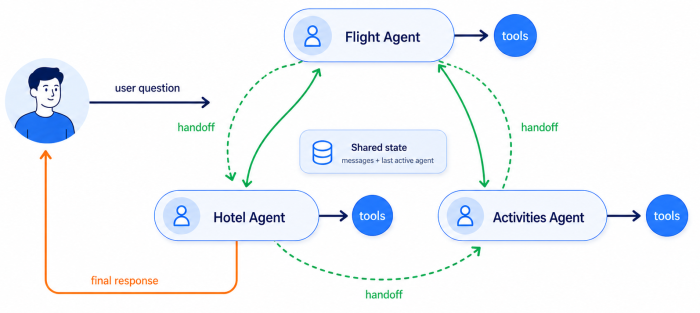


Most AI agents start out simple. A model receives a message, decides whether it needs a tool, calls that tool, looks at the result, and repeats until it can answer. For small tasks, this works well enough. The agent has one role, a manageable set of tools, and a short conversation history. The problem starts when that same agent has to become several specialists at once.
Imagine trying to build a travel assistant agent. That agent would be responsible for booking flights, hotels, handling itinerary constraints, refund policies, loyalty programs, user preferences and much more. You can try to keep adding tools and prompt instructions, but the system eventually becomes harder to control rather than more capable.
This phenomenon has a name, and it is called agent overloading. It happens when one agent is responsible for too many distinct behaviors, tools, and decision paths inside the same conversation. To solve this problem, we typically split the workload over multiple agents. LangGraph gives you several ways to do that, and one of the options is creating an agent swarm. The name itself is slightly misleading. In LangGraph, a swarm is not primarily a crowd of agents working in parallel and voting on the best answer. It is a handoff-based multi-agent system where agents directly transfer control to one another, and the system remembers which specialist was last active. This feature of swarms is key, as it ensures that we will stay with the currently relevant specialists instead of going back through a central coordinator on every turn.
What Are LangGraph Swarms
langgraph-swarm is the official Python package in the LangChain ecosystem for building swarm-style multi-agent systems on top of LangGraph. It provides a small set of helper functions for creating agents and the handoff tools they use to transfer control to one another during a conversation.
A swarm has multiple named agents. Each agent has its own prompt, tools, and role. One agent is active at a time. When the active agent decides that another specialist should take over, it calls a handoff tool. That tool updates the graph state and sends execution to the next agent. The result is a stateful relay, which functions different from a standard system that uses a central supervisor.
In a supervisor architecture, one central agent or workflow controls the process. The supervisor receives the user request, chooses which worker to invoke, receives the result, and decides what happens next. The workers are usually hidden from the user. They behave more like tools than conversation partners. This type of a system is a great fit for situations where the system needs to break one request into several subtasks, run them in parallel, and combine the results. For example, a market-research agent might ask separate workers to analyze pricing, regulation, competitors, and technical feasibility, then synthesize a final report.
In a swarm, the active agent is not a worker called by a manager. It is the current owner of the conversation, and when it hands off, the next specialist steps directly into that role. This makes swarms a better fit for stateful interactions where the user is working through something with a specific specialist and that specialist should persist across turns. A customer support assistant is a good example. The system might transfer a user from a billing specialist to a technical specialist, and then keep the technical specialist active while the user continues troubleshooting.
Basically, neither pattern is universally better. The decision which one to use boils down to whether the application requires centralized coordination or direct specialist continuity.
Article continues below
Want to learn more? Check out some of our courses:
The Core Pieces of a LangGraph Swarm
The langgraph-swarm package is intentionally small, and that is one of its strengths. It does not try to replace LangGraph's runtime, memory, persistence, middleware, or deployment system. It just gives you a compact set of helpers for building handoff-style graphs.
The public API centers on four pieces:
- SwarmState
- create_handoff_tool
- add_active_agent_router
- create_swarm
The SwarmState represents the default state schema that stores the conversation history and tracks the active agent. The create_handoff_tool is the helper that creates a tool an agent can call to transfer control to another specialist. The add_active_agent_router routes the start of a graph invocation to the currently active agent, while the handoff tool’s Command moves execution to another agent during the same run. Finally, create_swarm is a high-level function that assembles the swarm graph from a list of named agents.
That being said, it is worth being clear about what langgraph-swarm actually is and is not. The package handles graph construction. Everything else that matters in production comes from the broader ecosystem around it. LangGraph's checkpointing and persistence infrastructure handles durable execution. Checkpointers handle short-term memory. Stores handle long-term memory. Retries and human-in-the-loop controls are also LangGraph concerns. PII handling and call limits belong to the infrastructure or application layer. Observability typically comes from LangSmith or whichever tracing stack you put around the graph. langgraph-swarm does not own any of that. It gives you the wiring to connect specialists together, and hands the rest off to the tools already built for the job.
The Standard Workflow
As mentioned earlier, it is better to think of langgraph-swarm as a graph-construction helper rather than a separate orchestration platform. Therefore, understanding what it actually manages makes that clear.
The default state contains two fields. The first is messages, which stores the conversation history. The second is active_agent, which stores the name of the specialist that should handle the next step. By default, all agents communicate through the same shared messages key, which makes the system straightforward to build because every agent can read the same conversation history. However, keep in mind that also means agents can see messages that were not intended for them, so be very careful when creating swarms that sensitive information doesn't leak to the wrong part of the system.
Control moves between agents through handoffs. A handoff is implemented as a tool, which means an agent transfers control by calling it the same way it would call any other tool. The default handoff tool is usually named after the target agent, for example transfer_to_hotel_assistant. When the active agent calls that tool, it returns a LangGraph Command that tells the parent graph where to go next and how to update the state. That update appends the required tool message, sets active_agent to the target, and sends execution to that agent. Keep in mind that, like any other tool-calling agent, every time a tool is called it needs to be accompanied by a matching tool message. If you break that chain, the history becomes a mess. Even if the graph keeps running, the model might start acting up because its transcript is broken. So a handoff is more than just moving from one node to another. It is a state update that has to follow the right rules so the tool-calling process stays valid.
Of course, none of this would work across multiple turns without a checkpointer. A checkpointer is essential for keeping a swarm running across multiple turns. It saves the graph state, including chat history and the current agent, using a thread_id to link new messages to the right session. Without this ID, the system forgets which agent is active and loses its "memory." For local testing, an in-memory checkpointer works fine but wipes all data if the app restarts. Production systems need a durable checkpointer, like Postgres or Redis, to keep data safe. Since the swarm package is built on LangGraph, it uses LangGraph's built-in tools to handle all this heavy lifting automatically.
When To Use Swarms And When Not To
Use a swarm when the application has real specialists, and those specialists need to take turns being directly responsible for the conversation. The key conditions are:
- each agent has distinct tools, instructions, or success criteria
- the user benefits from staying with the active specialist across turns
- the workflow is mostly sequential rather than parallel
- the handoff topology can stay sparse and understandable
- the application can persist thread state with a checkpointer
On the other hand, avoid swarms when a single agent is enough. In that case, the extra complexity of handoff tools and state routing just gets in the way without adding any real value. Avoid swarms too when you need one central point to control routing. The supervisor pattern is much easier to follow because all routing decisions go through one node, keeping the flow clear and easy to trace. If your domain boundaries are blurry, for example billing versus account management, a supervisor handles misrouting better because directing traffic is all it does. Finally, avoid swarms when the work needs to happen in parallel. In a swarm, all agents sit at the same level and pass control to each other through handoff tools. There is no built-in way for them to run at the same time.
Understanding It Is Just the First Step
LangGraph swarms are not a general-purpose upgrade to your agent architecture. They are a specific solution to a specific problem. When one agent starts carrying too much responsibility, specialists make sense. When those specialists need to hold a conversation across multiple turns without bouncing through a central coordinator, a swarm is a natural fit. When neither of those conditions applies, simpler patterns will serve you better.
The core idea is straightforward. Agents are nodes in a graph. Handoff tools move control between them. A shared state keeps track of who is active and what has been said. A checkpointer makes sure that state survives across turns. Everything else, memory, observability, persistence, retries, comes from the broader LangGraph ecosystem rather than the swarm package itself.
Understanding that boundary is important before you write any code. The langgraph-swarm package is small by design. It handles graph construction and hands everything else off to the tools already built for the job.
In the next article, we will move from theory to practice. We will build a working swarm from scratch, wire up the handoff tools, connect a checkpointer, and walk through what actually happens at each step when control moves between specialists.

