


If you use an AI coding assistant seriously, you have probably built up a small collection of prompts you are proud of. Maybe you have a prompt that makes an AI agent review the code exactly as you would, or a prompt with constraints set up that ensure the agent always applies the smallest possible fix when refactoring code. While saving those prompts and then later pasting them in while tweaking a word or two might work for some time, you are going to run into a situation where those prompts start silently failing, and start producing worse and worse results. This is the quiet failure mode of prompt-based workflows. Nothing crashes. The quality just erodes, one small edit at a time.
In this article we will explain why one-off prompts do not scale, walk through the maturity ladder that leads from a prompt to a skill to a plugin, break down the anatomy of a well-designed skill, and cover the design principle that makes these workflows trustworthy.
One-Off Prompts Are Weak Infrastructure
A one-off prompt is easy to write, and for small, temporary tasks it is exactly the right tool. The problems start when the same workflow must be repeated across many documents, many projects, many teammates, or many tools. In those situations, problems often arise because different users phrase the same task in different ways, which can lead your AI agent to behave inconsistently. Constraints disappear because someone trimmed a part of the prompt by accident. Output formats drift, which makes results harder to compare across runs. Important checks get forgotten, because the person prompting has to remember the entire procedure every single time. In essence, a prompt keeps your workflow knowledge trapped in a chat window and in one person’s memory, making it one of the least durable ways to preserve it.
Team workflows need something more durable. They need reusable parts that live in files that can be inspected, versioned, reviewed in a pull request, and adapted across tools. Prompting still matters, and a prompt still starts every task. The difference is that the important workflow knowledge should not have to live entirely inside the user's prompt.
Article continues below
Want to learn more? Check out some of our courses:
The Maturity Ladder
There is a natural progression that workflow knowledge follows as it hardens from a habit into infrastructure. A strong prompt becomes a template, a template becomes a skill, and a skill can eventually be packaged inside a plugin.
A prompt is a one-time request. It is flexible, but easy to vary and easy to forget. A prompt template is a saved pattern that gets reused, which improves consistency but still relies on manual copying. An instruction file, such as project rules in Cursor, custom instructions in Copilot or AGENTS.md, adds persistent guidance that applies automatically, but it applies broadly, and broad guidance can quietly bloat. A skill packages a specific, repeatable procedure the agent can follow on demand, with its own supporting files. And a plugin wraps one or more skills into an installable package that can be distributed across a team and discovered through a marketplace.
Each step on the ladder solves the scaling problem created by the previous one, while introducing a new design question of its own. Templates solve inconsistency, but not distribution. Instruction files solve persistence, but not scope. Skills solve scope, but require careful trigger design. Plugins solve distribution, but bring host-specific packaging concerns.
The rest of this article will focus on explaining how skills work, but before we get into that it is worth pinning down one distinction immediately, because it often causes confusion. That distinction is that skills are not rules. A skill is task specific, meaning it describes how to perform one repeatable workflow. Rules and instructions are broader project or team guidance and include conventions, constraints and standards that apply across many tasks. Rules can support a skill, but they are not the skill itself. If you find yourself writing a "rule" that describes a multi-step procedure with inputs and outputs, you are writing a skill in the wrong place.
What a Skill Actually Is
A skill is a reusable task procedure for an AI agent. It is more structured than a prompt, but less host-specific than a plugin. In practice, it is a folder that consists of a main instruction file, usually called SKILL.md, surrounded by supporting files.
A well designed SKILL.md file tells the agent several things:
- when to use the skill, and when not to use it
- what the workflow is meant to achieve
- which inputs to inspect
- which steps to follow
- which supporting files to consult
- which outputs to produce
- which boundaries must not be crossed
This is what a typical SKILL.md file looks like:
---
name: tech-adoption-review
version: 2.1.0
description:
  Use this skill when reviewing a technology-adoption proposal — such as a
  memo, RFC, or Deep Research report proposing that a team adopt a new
  framework, library, platform, or tool — for recommendation clarity,
  supporting evidence, fit with the current stack, realistic risk and cost,
  alternatives, and open questions.
---

# Technology Adoption Review

## Purpose

Review the quality of a technology-adoption case and produce a structured
report that helps a human reviewer judge whether the case is decision-ready.

## When to use this skill

- The input is a memo, RFC, ADR, or research report proposing the adoption
  of a framework, library, platform, or tool.
- The user asks whether an adoption case is clear, well-evidenced, or ready
  for a decision.

## When NOT to use this skill

- The input is a general research summary with no adoption recommendation.
- The user asks which technology the team should choose.
- The task is implementing or configuring the technology itself.

## Required input

A single proposal document. If no document is provided, ask for one instead
of reviewing from memory.

## References

- `references/evidence-checklist.md` — the nine review dimensions, with
  diagnostic questions and red flags. Apply to every review.
- `references/deep-research-review.md` — stricter citation checks. Apply
  only when the input is a source-heavy research report.
- `references/common-failure-modes.md` — reviewer anti-patterns. Self-check
  against this list before finalizing the report.
- `report-template.md` — the required report structure.

## Workflow

1. Confirm the input is an adoption case. If it is not, produce a report
   with the verdict "Not applicable as an adoption case."
2. Read the full proposal before judging any part of it.
3. Evaluate the proposal against every dimension in
   `references/evidence-checklist.md`.
4. If the input cites external sources, also apply
   `references/deep-research-review.md`. Treat any unverifiable citation
   as an evidence gap. Do not repair gaps from your own knowledge.
5. Draft the report using the exact section structure in
   `report-template.md`.
6. Self-check the draft against `references/common-failure-modes.md`.
7. Run `scripts/validate_report.py` on the report and fix any reported
   failures before returning it.

## Output requirements

- Follow `report-template.md` exactly: all six sections, in order.
- State exactly one verdict label in the Summary Verdict section.
- Include this boundary line verbatim: "This review assesses the quality
  of the adoption case. It does not decide whether the team should adopt
  the technology."

## Boundaries

- Do not make or imply the adoption decision.
- Do not add evidence the proposal does not contain.
- Do not soften findings to be agreeable; report gaps plainly.
The description field in the metadata matters most of all, because it is how the agent decides whether the skill applies to the current task. Compare it to a weak description like "Use this skill for research," which would trigger for everything and nothing. The description above names the workflow, the expected input, and the scope, which is exactly what the agent needs to select the skill at the right moments and leave it alone the rest of the time.
The negative triggers are just as important as the positive ones. "When NOT to use this skill" is what prevents scope creep. Without it, a well-meaning agent will happily apply the review workflow to documents it was never designed for. Notice also that one of the negative triggers, "the user asks which technology the team should choose", restates the skill's boundary from the opposite direction, which is typically something you want to do to ensure the skill gets used only when you want it to be used.
The workflow section is deliberately short, and almost every step points outward to a supporting file. This is how you want to design skills. The main file should define the order of operations, while the checklist, citation checks, report template, examples, and validator carry the detail. In this skill’s workflow, step 4 also includes one of the most important rules: if a citation cannot be checked, the agent should report it as missing evidence instead of trying to fix it using its own knowledge.
The output requirements are intentionally written so they can be checked mechanically. The report must use an exact section structure, include exactly one verdict label, and contain one boundary line that appears word for word. We will see why this wording matters when we get to the validation script.
This separation is important. A common mistake is to turn SKILL.md into a giant manual. In practice, the file should orchestrate the workflow, not contain every piece of supporting material. Long quality standards belong in checklist files. Templates belong in template files. Example outputs belong in example files. Mechanical validation belongs in scripts. The main file should simply point to these assets, which is exactly what the references section of the skill above is doing.
From Skills To Plugins
Once the skill itself is well structured, the next question is how to package it for different tools. This is where the move from skills to plugins begins.
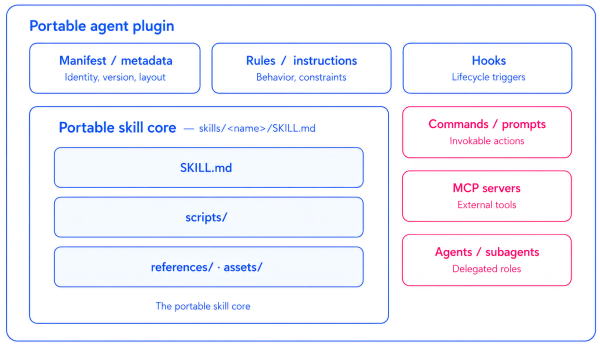
Cursor, Claude Code and other tools all support skill-like workflows, and the underlying concepts overlap heavily. However, they do not handle packaging in exactly the same way. They differ in where files need to live, how manifests are structured, how hooks are wired, and how registration works. If your workflow is written as one monolithic, tool-specific file, turning it into a plugin for another host usually means rewriting it. If the workflow is separated cleanly, turning it into a plugin mostly means wrapping the same core in a different adapter.
A useful way to think about this is in terms of five layers. The first four make up the portable core:
- the task procedure, stored in a SKILL.md file
- the quality standard, a supporting asset that defines what “good enough” means
- the output template, a supporting asset that defines the required shape of the result
- the deterministic check, a separate Python script that validates the output structure
All four layers are plain files with no host-specific assumptions. That means they can be copied across tools with little or no change.
The fifth layer is the host adapter. This is the part you should expect to rewrite for each tool. It includes the manifest, folder conventions, hook wiring, and registration mechanics. Keeping this adapter separate is what allows the skill itself to stay stable while the surrounding plugin packaging changes from host to host.
Put simply, the skill is the portable core, and the plugin is the host-specific wrapper around it. Write the core once, then adapt it for each environment you want to support. Do not design the workflow around one host and then try to retrofit it elsewhere.
Using this approach, we can convert the skill into a plugin that can be installed in a tool like Cursor, but that hands-on process deserves its own follow-up article.

